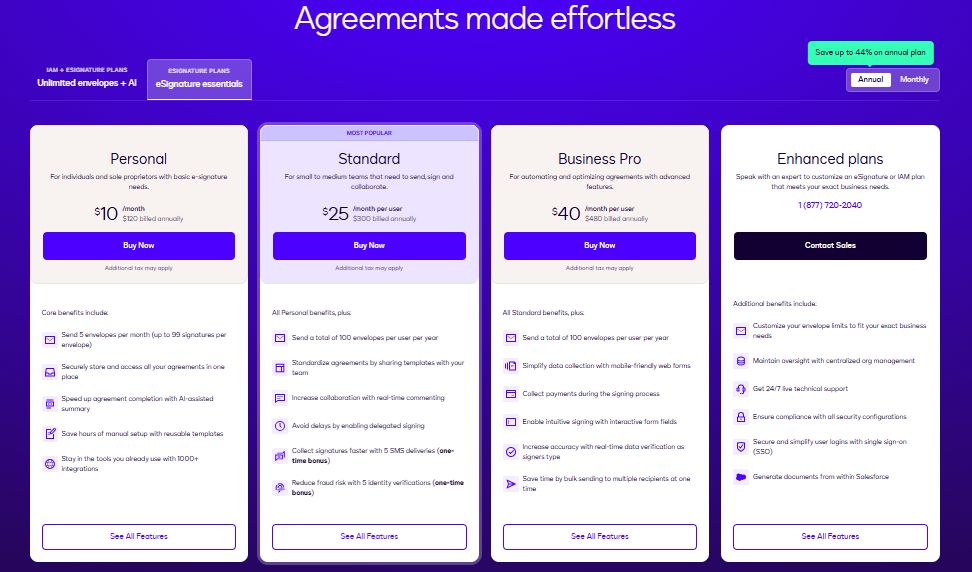
- DocuSign CLM pricing starts at $10/user/month for the Personal tier, $40/user/month for Business Pro (billed annually), and $10,000 to $50,000+ per year for Enterprise CLM with custom quotes based on user count and feature requirements.
- Hidden costs include implementation fees ($200 to $350/hour for DocuSign Professional Services), annual price escalators of 5 to 8%, Salesforce integration ($5,000 to $15,000), and envelope overages at $1 to $2 per envelope.
DocuSign CLM pricing ranges from $10/user/month (Personal) to $40/user/month (Business Pro), with Enterprise CLM starting at $10,000 to $50,000+ per year on custom quotes. The actual cost is typically higher once you factor in implementation, integrations, and annual price escalators that can add 5 to 8% per year.
If you’re evaluating DocuSign CLM or trying to compare Docusign plans, this guide breaks down Docusign CLM pricing plans, per-user costs, user reviews (G2: 4.3/5, Capterra: 4.5/5), pros and cons, and budget-friendly alternatives like HyperStart CLM. The DocuSignCLM price varies by tier and organization size, ranging from $10/user/month for basic e-signature to $50,000+/year for full enterprise CLM.
What is DocuSign CLM, and what does it include?
DocuSign CLM (formerly Spring CLM) is an enterprise contract lifecycle management platform that automates contract creation, negotiation, execution, and renewal tracking. The platform includes AI-assisted negotiation, automated routing workflows, a drag-and-drop contract designer, and integrations with Salesforce, Microsoft, and SAP. Docusign CLM holds 8.99% market share in the contract management category, ranking fifth behind SAP Ariba Contracts (11.95%) and Deltek Costpoint (9.19%), according to 6sense (2025).
Built using artificial intelligence technology, DocuSign CLM is a reliable tool for managing all stages of the contract lifecycle. Before exploring exact costs, it’s important to understand the key factors affecting DocuSign CLM pricing—including user count, envelope volume, feature tier, and integration requirements. These DocuSign CLM pricing factors directly influence your total investment.
A 6sense report estimates DocuSign CLM’s share in the CLM market at 6.11%, giving it the 5th position in the top CLM platforms. Some of the key features of this platform are:
Auto-populate new agreements
Set conditional rules
Automated contract routing
AI-assisted negotiation
Drag-and-drop contract designer
Now that you know what DocuSign CLM is all about, let’s jump directly into its pricing.
How much does DocuSign CLM cost in 2026?
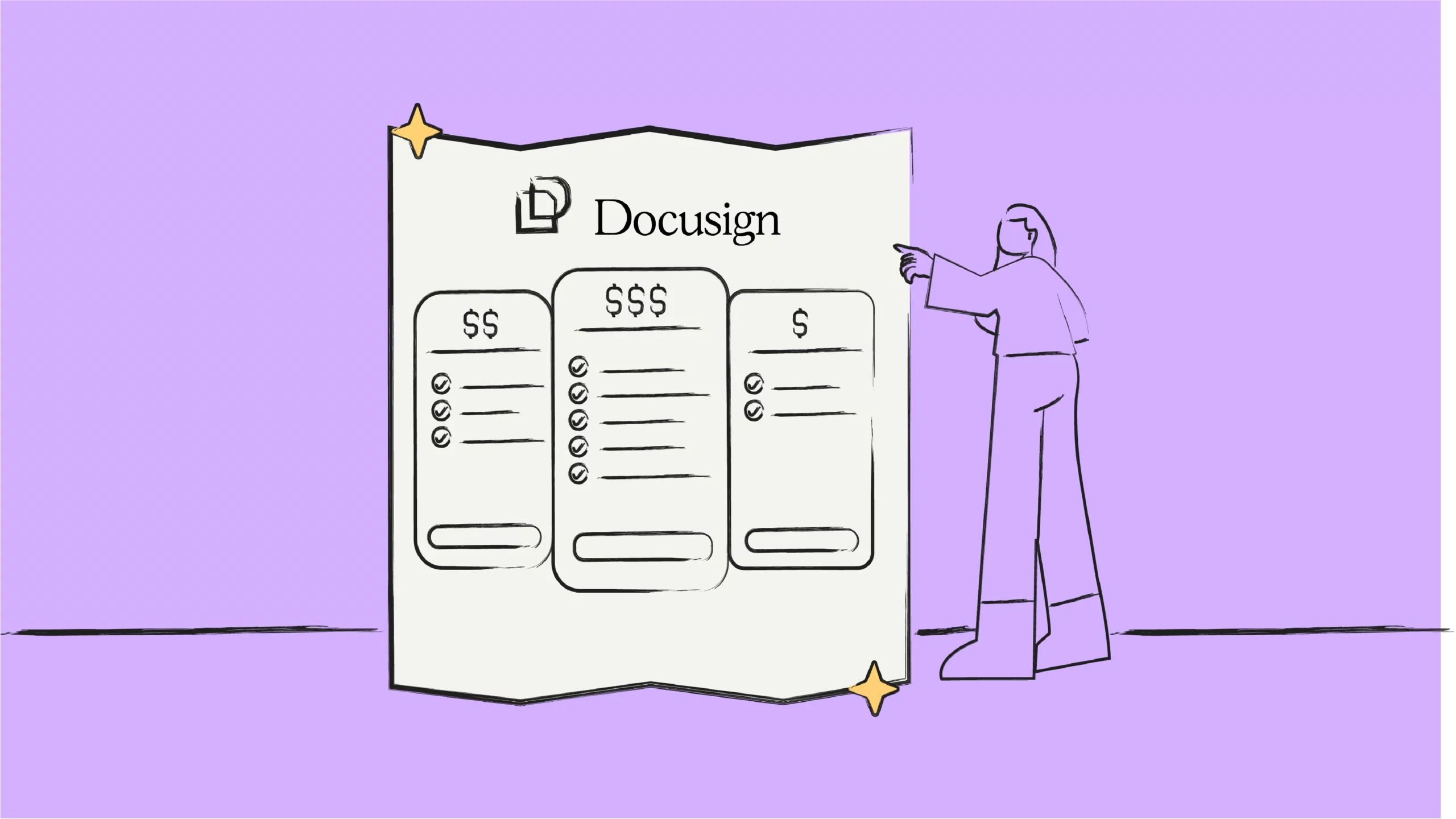
DocuSign CLM costs $10/user/month for the Personal tier, $40/user/month for Business Pro (billed annually), and $10,000 to $50,000+ per year for Enterprise CLM on custom quotes. The actual total cost is higher because DocuSign CLM contracts typically include annual price escalators of 5 to 8%, implementation fees ranging from $200 to $350/hour, and integration costs that can add $5,000 to $30,000 depending on the platform.
Enterprise-level CLM with advanced features requires custom quotes, typically ranging from $10,000-$50,000+ annually for teams of 10-50 users. Based on user reviews, the cost of DocuSign CLM (including implementation) tends to be on the higher end compared to alternatives like HyperStart CLM.
The DocuSign CLM pricing model follows a per-user, per-month structure for standard tiers, while enterprise CLM uses custom quotes. You can contact their support team and share your requirements for a unique DocuSign CLM pricing per user quote tailored to your organization. Organizations can contact support to receive personalized quotations based on specific requirements. The global Contract Lifecycle Management (CLM) solution market is projected to grow from billion in 2026 to billion by 2034, registering a CAGR of, driven by accelerating adoption of AI-powered automation and increasing need for legal compliance, according to Fortune Business Insights.
For context on overall CLM market pricing, the global contract lifecycle management market reached $2.07 billion in 2026 and is projected to grow to $5.09 billion by 2034 at a CAGR of 11.9%, according to Fortune Business Insights.
Mid-market companies typically pay $15,000 to $50,000 annually for CLM software, while large enterprises spend six figures or more depending on user count and feature requirements.
Like DocuSign CLM, HyperStart CLM also offers custom quotations. These quotations are based on factors like the number of modules you require, the number of users, and the number of contracts you want to manage. Here’s a head-to-head feature comparison of HyperStart CLM vs DocuSign CLM:
| Features | HyperStart CLM | DocuSign CLM |
| AI-based Metadata Extraction |  |  |
| Automated Dashboard and Reports | | |
| Auto-reminders for Renewal Tracking | | |
| AI Redlining & Review | 95% Accurate | Fair |
| Self-serve Templates & Workflows | | |
| Conditional Logic | | Limited |
| Ad Hoc Approvals | | |
| Counterparty Collaboration | Automated | Manual |
| Microsoft Word Plug-in | | |
| In-browser Review | | |
| AI Search | Custom | Predefined |
| Org-wide Access Control | | |
| In-flight Analysis | | |
Save $20 Per Contract With HyperStart CLM
HyperStart CLM makes managing contracts affordable, efficient, and automated. Get great savings on every agreement and realize your ROI 75% faster.
What are the hidden costs of DocuSign CLM?
The hidden costs of DocuSign CLM include implementation fees ($200 to $350/hour through Docusign Professional Services), annual price escalators of 5 to 8% that can turn a $75,000/year contract into nearly $95,000 by year five, Salesforce integration setup ($5,000 to $15,000 for standard, $15,000 to $30,000 for advanced), SAP integration ($10,000 to $25,000), envelope overages at $1 to $2 per document, and initial training costs of $5,000 to $15,000 for a mid-market team.
These additional expenses can double the total spend over three years. A company paying $75,000/year for the base license may end up spending $150,000 to $200,000 annually once implementation support, integrations, overages, and escalators are factored in. Organizations evaluating DocuSign CLM should request a full total cost of ownership (TCO) estimate that includes all service fees, not just the per-user license rate.
What DocuSign CLM license types are available?
DocuSign CLM offers three main license types: Personal ($10/user/month) for individual document signing, Business Pro ($40/user/month billed annually) for teams needing templates, payment collection, and advanced fields, and Enterprise CLM (custom pricing, typically $10,000 to $50,000+/year) for organizations requiring full contract lifecycle management with AI-powered negotiation, automated workflows, and Salesforce integration.
The license type determines which features are available. Personal and Business Pro plans are primarily e-signature products with some contract management features. Full CLM functionality, including automated contract routing, obligation tracking, and AI-assisted redlining, requires the Enterprise CLM license, which is priced per organization rather than per user.
What do users say about DocuSign CLM pricing and value?
DocuSign CLM receives mixed reviews on pricing and value. The platform scores 4.3/5 on G2 (485 reviews) and 4.5/5 on Capterra (119 reviews), but multiple reviewers describe the pricing as “a bit high” and “more expensive than similar platforms.” Users praise the platform’s automation capabilities and ease of use for signatures, while citing implementation complexity, UI latency, and limited self-service customization as drawbacks.
Here are the pros and cons of DocuSign CLM based on our assessment of user reviews on its G2 page. We have also added user reviews to help you understand the platform’s consumer perspective.
Pros of DocuSign CLM
Offers extensive functionalities to automate CLM-related tasks, especially reporting and signing.
DocuSign CLM has a simple-to-use user interface and offers straightforward, quick implementation.
Organizations can custom-brand contracts and other legal documents using this platform, thus elevating customer experience.
DocuSign CLM offers secure and efficient signing options with authentication certifications and bulk-signature functionality.
This platform integrates flawlessly with external tools like Salesforce, Google Workspace, Oracle NetSuite, Microsoft, Slack, Stripe, Zoom, and other business applications.

“Docusign CLM is very easy to use and offers straightforward implementation. The customer support team is very helpful as well. Being a part of a sales organization, I use DocuSign CLM almost every week, and no NDA goes unsigned, thanks to this platform. The best part? I can even track opens, closes, etc, through this platform.”
Cons of DocuSign CLM
Migrating existing contract data from legacy systems to Docusign CLM can be challenging and may require availing support from Docusign CLM’s team.
External stakeholders—those not using Docusign CLM—cannot edit the contract’s attributes. Your team has to revise contracts manually after redlining and negotiation.
Some users report facing glitches with the signatory authentication feature. The platform repeatedly requests authentication from signatories, thus hampering their signing experience.
Some users report facing latency issues with DocuSign CLM. The system may take some time to load the contract.
Some users state that DocuSign CLM is priced on the higher end and thus may not be a viable option for small and medium-scale businesses.
Now that you know the price, pros, cons, and user reviews of DocuSign CLM, you must be wondering, is DocuSign CLM worth its price? Let’s find out.
“Thanks to DocuSign CLM, we can now automate our business processes. However, there are a few areas where this platform can improve, like the user interface and the contract loading time. Moreover, the reporting feature could have been better, since currently there is no option to add both OR AND filters.”
Is DocuSign CLM worth the price?
DocuSign CLM is worth the price for large enterprises (500+ employees) that need deep Salesforce integration, complex workflow automation, and a recognized brand for external counterparty signing. For small and mid-sized businesses, the starting price of $10,000 to $50,000+/year for Enterprise CLM, combined with 6 to 12 month implementation timelines, may not justify the investment when alternatives like HyperStart CLM deploy in 4 weeks at a fraction of the cost.
The cost of not having effective contract management can also be high. Choosing the best contract management software matters because, according to World Commerce & Contracting, poor contract management costs organizations an average of 9.2% of their annual revenue. For a mid-sized company with $50 million in revenue, that translates to $4.6 million in annual losses from missed renewals, unfavorable auto-renewals, and compliance gaps.
Before you purchase a subscription, it is worth asking whether the DocuSign CLM cost delivers optimal returns on investment for your organization’s size and contract volume.
“DocuSign CLM helps us engage clients and enter into a binding contract before we offer our services. However, the platform’s price is a bit high, which is something we dislike about the product.”
“The software is easy to use for document storage and offers secure cloud storage. However, the licensing cost is a little bit higher than that of other similar platforms.”
“DocuSign CLM is best-in-class but an expensive option. The total cost is determined by the volume of activity, which can rack up quickly—making it an expensive CLM option in comparison to other platforms.”
“DocuSign CLM is worth the price! I appreciate the program’s simplicity and ease of use.”
“DocuSign CLM has become a very capable, affordable, and easy-to-use system. It easily adapts to dynamic business environments and supports nuanced processes.”
Still not convinced? Book a free demo for HyperStart CLM today and get started with effective, affordable contract management.