
![Managing Contracts Using Excel: A Detailed Guide [With Template]](https://www.hyperstart.com/wp-content/uploads/2024/12/Blog-08-white-scaled.webp)
- A contract management template in Excel is a spreadsheet pre-built to track contract IDs, parties, dates, values, obligations, and renewal deadlines in one place.
- Excel contract management works best for teams with fewer than 30 agreements and no automation or compliance audit requirements. Mid-market legal teams typically outgrow spreadsheet tracking within 12-18 months as contract volume and compliance demands grow, prompting a move to dedicated contract management software.
A contract management template in Excel is the lowest-cost starting point for teams that need structure but aren’t ready for dedicated contract management software.
According to World Commerce and Contracting’s 2024 State of Contract Management report, mid-market legal teams that rely on spreadsheets to manage contracts contribute directly to the 9.2% average revenue loss from contract mismanagement. As per Artificial Lawyer, 62% of General Councils still use tools like Excel, SharePoint, and Email to manage contracts.
This guide covers a free Excel template for contract management. You will learn how to use, how to set it up, Excel formulas for tracking, and when to switch from spreadsheets to a contract management software platform.
Free Excel contract management spreadsheet template
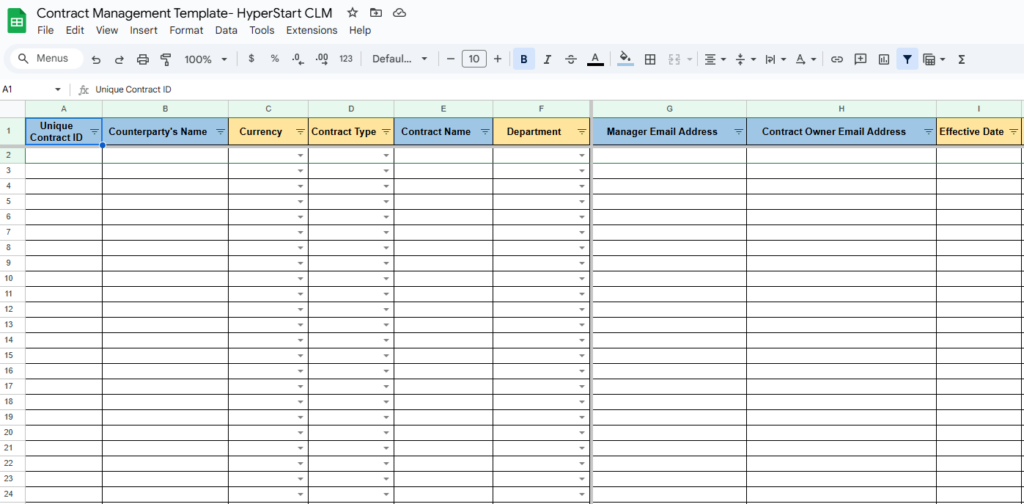
If you want to manage contracts using Excel sheets, you will need a contract management spreadsheet template that can handle your legal documents.
This format should be designed for optimal visibility over all contracts at a glance.
To save you the trouble, we have created a simple, free Excel contract management template that works well with all types and complexities of contracts. This template covers all the critical contract management components and is available for you to download and use.
Use this template and get started with Excel contract management. However, know that managing contracts using Excel comes with considerable challenges and setbacks. The coming section talks about these challenges
Contract tracking template
Whether you need a contract tracking template, a contract tracking spreadsheet, a compliance tracker, or a renewal calendar, this Excel template for contract management has you covered.
What is contract management in Excel?
Contract management in Excel is the process of using a spreadsheet to track, store, and organize contracts, key dates, obligations, and counterparties in a centralized digital format.. It’s a low-cost starting point for small teams but lacks automation, security, and scalability that dedicated contract management software provides.
This digital approach helps organizations shift from paper-based processes to a structured digital system for handling contracts and legal documents. Teams exploring contract lifecycle management in Excel typically start with a spreadsheet tracker before eventually moving to dedicated software.
With Excel, organizations create centralized spaces to store, analyze, track, and manage business contracts and legal documents. In effect, a well-structured Excel file acts as a contract database where contract managers, legal professionals, compliance managers, and department managers can access key contract information.
But, what is the need to manage contracts with Excel? Let’s find out in the coming section.
Why do teams use Excel for contract management?
Teams use Excel because it’s free, familiar, and requires no training. It works well for small contract volumes (under 30 agreements) where automation isn’t critical. Once volume, compliance, or collaboration needs grow, dedicated CLM software becomes necessary.
1. Cost-effective way to get started
Purchasing a dedicated contract management software can be an expensive and inviable option for small-scale organizations. According to TrustRadius, the cost of a dedicated contract management solution can range from USD 20 to over USD 100 per user per month, depending on features and contract volume. On the other hand, Excel is a cost-efficient way to get started with contract management. Most organizations already use the Microsoft 365 suite, making Excel useful for managing contract management processes.
2. No additional training required
Managing contracts with a CLM (Contract Lifecycle Management) tool requires additional training on features and functionalities. However, most organizations and individuals are familiar with at least basic Excel functions and features. Creating filters, managing sheets, and customizing ranges are no-brainer tasks in Excel and can be done with no extra training.
3. Easy inter-department sharability
A contract tracker in Excel makes it easy to share contract data among cross-functional teams like procurement, sales, finance, and legal. You can simply provide the Sheet’s access to different teams and enable access to insightful contract details and insights.
Excel vs CLM software Compared
Before diving into each benefit, here’s a quick comparison of managing contracts in Excel versus using a dedicated contract management platform:
| Capability | Excel spreadsheet | Contract management software |
| Contract storage | Local files or shared drives with no version control | Centralized, encrypted repository with version history |
| Obligation tracking | Manual checks; no automated reminders | Automated alerts for renewals, expirations, and deadlines |
| Data entry | Fully manual; error-prone at scale | AI auto-extracts metadata from uploaded contracts |
| Security | Password protection only; no role-based access | Role-based access, encryption, and audit trails |
| Reporting & insights | Basic charts and pivot tables | Real-time dashboards with contract performance analytics |
| Collaboration | One person edits at a time; version conflicts | Multi-user access with activity logs and approval workflows |
| Scalability | Performance degrades beyond a few hundred contracts | Built to handle thousands of contracts across departments |
| Setup cost | Free (included with Microsoft 365) | Varies by vendor; HyperStart deploys in 4 weeks |
Not sure if it’s time to switch? Calculate your CLM ROI to see your potential savings. Modern businesses use contract organization software like HyperStart to automate contracts from start to finish.
Now that you know why Excel is an excellent tool for managing contracts. However, know that managing contracts using Excel comes with considerable challenges and setbacks. The coming section talks about these challenges
6 reasons why you should not manage contracts using Excel
According to a WorldCC study, an average company loses 9% in contract value due to mismanagement and manual processes. This estimate is even higher for larger organizations, at 15%. Relying on tools like Excel to manage hundreds of approvals, obligations, compliance requirements, and other contracting inefficiencies. Here’s how:
1. Manual obligation and milestone tracking
Tracking contracts, managing obligations, and ensuring commitment fulfillment are essential functions of contract management. However, with Excel, obligation tracking becomes cumbersome due to limited notification and alert functionalities. When organizing large contract datasets with Excel, it becomes challenging to keep a record of every milestone and obligation. This exposes organizations to missed obligations.
2. Reduced visibility over contractual performance
Every contract manager is concerned with one pressing question: “How well are the contracts performing?” Robust contract performance management helps derive insights from contract dashboard and identify and eliminate process bottlenecks. Excel does not offer functionalities to track and monitor contract performance, taking away the essential CLM insights from contract managers.
3. High chances of non-compliance
Contractual non-compliance is disastrous for any organization. It hampers business relations, leads to lawsuits, and often ends up in contract termination. When managing contracts with Excel, contract managers, and other key stakeholders often end up missing crucial compliance requirements, primarily due to the lack of visibility over them.
4. Compromised contract security and confidentiality
Contracts contain sensitive business information, trade secrets, and other confidential data, and thus need to be protected. By managing and storing contracts in Excel sheets, you considerably compromise on confidentiality. This may result in contract violations and breaches, leading to lawsuits.
5. More time spent on manual data entry and extraction
Manual data entry is a time-consuming task—even with a well-built contract management template in Excel—and can quickly become a major bottleneck in CLM. When managing contract data in Excel sheets, contract managers have to manually enter all the necessary information. Moreover, this information needs to be updated as the contract gets refreshed and renegotiated. Manual data entry is a time-consuming task and can end up becoming a major bottleneck in CLM.
6. Increased risk of human errors and negligence
Manually entering contract data into Excel sheets and managing agreements is error-prone on account of human negligence. When entering information on hundreds of contracts every day, there are chances of data errors, which is a common root cause of contract mismanagement.
Still tracking contracts in spreadsheets
HyperStart CLM automates what Excel can’t: from obligation alerts to AI-powered contract review with 94% accuracy. Go live in 4 weeks, not months.
Book a DemoExcel is not your best choice for managing contracts. So, what is the solution? For successful contract management, we recommend you use contract automation software. Let’s find out why.
How to create your own Excel contract management template
Creating a contract management template in Excel is a practical way to organize and track your agreements when you’re just getting started. A well-structured spreadsheet helps you centralize contract data, monitor key dates, and reduce the risk of missed obligations.
Follow these steps to build an effective Excel contract management template from scratch:
Step 1: Define your contract data fields
Start by identifying the key information you need to track for every contract. These fields will form the columns of your spreadsheet and act as the foundation of your contract database.
Here are the essential fields to include:
| Field | Example | Description |
|---|---|---|
| Contract ID | CNTR-2026-001 | Unique identifier for each contract |
| Contract title | Vendor Agreement | Name of the contract |
| Counterparty | ABC Pvt Ltd | The other party involved |
| Contract owner | John Doe | Person responsible for the contract |
| Department | Legal / Sales | Owning team |
| Contract type | NDA / MSA / SaaS | Type of agreement |
| Start date | 01-Jan-2026 | Contract start date |
| End date | 31-Dec-2026 | Contract expiration date |
| Renewal date | 01-Dec-2026 | Renewal or notice deadline |
| Contract value | $50,000 | Total contract value |
| Status | Active / Expired | Current lifecycle stage |
| Obligations | Monthly reporting | Key deliverables or commitments |
| Notes | Auto-renews annually | Additional context |
Step 2: Structure your spreadsheet
Once your fields are defined, organize them into a clean and easy-to-use spreadsheet layout.
- Use one main sheet as your contract tracker
- Keep one row per contract
- Use clear column headers for each field
- Freeze the top row for better navigation
- Use filters to quickly sort and find contracts
You can also create additional sheets for:
- Renewal tracking
- Contract summaries
- Department-wise views
A structured layout ensures your spreadsheet remains scalable — though as your contract volume grows, learn how to organize contracts beyond spreadsheets for better efficiency.
Step 3: Add formulas and automation for tracking
To make your Excel contract tracker more efficient, use built-in formulas and features to automate repetitive tasks.
Conditional formatting for renewal alerts
Highlight upcoming deadlines automatically:
- Yellow → 90 days before expiry
- Red → 30 days before expiry
Go to:
Home → Conditional Formatting → New Rule
Data validation dropdowns
Standardize fields like:
- Status (Active, Expired, Pending)
- Contract type
- Department
Go to:
Data → Data Validation → List
XLOOKUP / VLOOKUP
Use lookup functions to fetch contract details across sheets.
Example:=XLOOKUP(A2, RenewalSheet!A:A, RenewalSheet!B:B)
SUMIFS for contract value tracking
Track total contract value by department or status.
Example:=SUMIFS(Value, Department, "Legal", Status, "Active")
INDEX + MATCH for advanced lookups
Use when managing large datasets across multiple sheets.
These formulas help reduce manual effort and improve tracking accuracy.
Step 4: Maintain and manage your contract tracker
Creating the template is only the first step — maintaining it is equally important.
Follow these best practices:
- Assign a single owner responsible for updating the spreadsheet
- Update contract data regularly after renewals or changes
- Review the tracker monthly or quarterly to avoid missed deadlines
- Control access permissions to prevent accidental edits
- Use cloud storage (OneDrive/SharePoint) for better collaboration
Without proper maintenance, even a well-built Excel template can become outdated and unreliable.
Step 5: Understand Excel’s limitations
While Excel is a great starting point, it has limitations as your contract volume grows:
- No automated alerts or reminders
- Manual data entry increases errors
- No audit trails or version control
- Limited collaboration and integrations
As your business scales, you may need to move from Excel to a dedicated contract management software for better automation and control.
If you’re managing fewer than 30 contracts, this Excel template will work well. But once your contracts grow in volume or complexity, consider upgrading to a CLM platform to avoid compliance risks and inefficiencies.
Contract management software: A better way to manage contracts
While an Excel-based contract tracking spreadsheet can work in the short term, it lacks the automation and control a modern platform provides. Contract management systems are dedicated platforms designed to handle the entire contract lifecycle. Platforms like HyperStart CLM use artificial intelligence technology to automate the contract management process, thus aiding efficiency.
Here are the benefits of using contract management software over Excel:
- Automates repetitive tasks and auto-extracts data with AI
- Offers better visibility through a centralized contract management dashboard in Excel
- Promotes safe contract storage in a secure repository
- Automates alerts for upcoming obligations
- Helps identify and eliminate CLM bottlenecks with ease
Let’s understand each of these benefits in detail.
1. Automate repetitive tasks and auto-extract data with AI
AI streamlines routine tasks like contract creation, data entry, and approval workflows.
Auto-extracts metadata with AI, retrieves key data in seconds, and visualizes contract intelligence in real time.
Reduces the time spent on contract admin, increases overall productivity, minimizes human errors.
2. Get better visibility through a centralized dashboard
Centralizes all contract-related data in one place for easy access and tracking.
Provides real-time insights into contract statuses, key dates, and performance metrics.
Simplifies contract monitoring by allowing quick filtering and searching of contracts.
Enhances collaboration by giving stakeholders a shared view of the contract lifecycle.
3. Store contracts in a secure repository
Ensures contracts are stored in a centralized, encrypted location to prevent data breaches.
Provides version control to maintain accurate and up-to-date contract records.
Protects sensitive information with role-based access and multi-factor authentication.
Reduces the risk of losing important contracts stored on local drives or shared folders.
4. Get automated alerts for obligations
Sends timely reminders for key dates like renewals, expirations, and payment deadlines.
Prevents missed obligations that could lead to penalties or lost opportunities.
Helps maintain compliance with contractual terms and regulatory requirements.
Reduces the need for manual calendar tracking or follow-ups.
5. Easily identify and eliminate CLM bottlenecks
Tracks where contracts are delayed in the lifecycle, such as approvals or negotiations.
Provides actionable insights to optimize approval workflows and reduce turnaround times.
Highlights inefficiencies like redundant processes or resource constraints.
Empowers teams to resolve bottlenecks quickly and improve overall efficiency.
Outgrow Excel Without the Growing Pains
Mid-market teams switch to HyperStart CLM and see 93% lower contract admin costs with 70% faster turnaround. Setup takes just 4 weeks.
Book a DemoUsing contract management platforms is a better option than managing contracts with Excel. There are many cost-efficient and advanced contract management software like HyperStart CLM that you can use instead of Excel sheets.
Simplify contract management with CLM
While tools like a contract management template in Excel can help you get started, spreadsheets are not designed to manage contracts at scale. There’s a better way with AI-powered contract lifecycle management software like HyperStart CLM, purpose-built for mid-market companies.
HyperStart CLM helps overcome the drawbacks of traditional Excel-based contract management with powerful AI and smart contract management features. With HyperStart CLM, you can go above and beyond with contracts and create, review, redline, approve, sign, store, track, and analyze all agreements centrally. Here’s how:
- 93% reduction in contract admin costs
- 70% faster contract turnaround times
- 94% AI accuracy for contract review and data extraction
- Go live in just 4 weeks, not months
- 5+ hours saved weekly per team member
Still unsure? Book a demo today and see HyperStart CLM in action. Get started with a 7 day free trial.