
PandaDoc is a popular document automation tool for creating, sharing, and signing business documents. But as teams scale, it often falls short — limited contract lifecycle management capabilities, basic approval workflows, and minimal compliance tracking become real obstacles.
TL;DR
Common user concerns with PandaDoc
Mid-market and enterprise alternatives
While PandaDoc offers fast implementation and ease of use, it struggles with higher-level complexity, as noted in this report by MGI Research. For growing businesses that need more than basic proposal management, finding the right PandaDoc alternative becomes essential.
This PandaDoc comparison breaks down 10 PandaDoc competitors worth evaluating. Whether you need a PandaDoc replacement or you’re exploring PandaDoc alternatives for the first time, you’ll find features, pricing, and use cases for each below.
Why consider PandaDoc alternatives and competitors?
PandaDoc has undeniably made a significant impact on the proposal management landscape. However, like any software, it has its shortcomings (see our detailed PandaDoc review for a deeper analysis). Every PandaDoc competitor on this list addresses gaps that matter — here’s a closer look at why businesses explore the best contract management software as a PandaDoc alternative:
PandaDoc’s feature set may need to be revised for legal teams due to a need for advanced legal features like conditional logic, external contract negotiation, and the ability to create complex documents with tailored contract templates.
PandaDoc may fall short of those requiring more adaptable and customizable features.
PandaDoc doesn’t support copying and pasting images directly into documents, which can be a significant inconvenience.
The platform doesn’t allow specifying an exact expiration time for documents, which can be problematic if precise timing is necessary.
PandaDoc lacks comprehensive contract lifecycle management features like version control, audit trails, and clause libraries.
Beyond these core gaps, users looking for the best PandaDoc templates for freelancers or the best PandaDoc templates for service agreements often find the built-in options too generic for specialized documents. Teams searching for the best CRM that integrates with PandaDoc often find native options restricted to Salesforce and HubSpot. There’s no built-in notarization, making a PandaDoc notary alternative a common search. These gaps are frequently discussed in PandaDoc alternatives Reddit threads and user review sites.
PandaDoc’s pricing also becomes a factor as teams scale. With its business plan starting at $65 per seat per month and its starter plan at $19 per user per month, costs add up quickly — making a PandaDoc cheaper alternative an attractive option for teams that need advanced contract management features.
These limitations can add up, making it harder to finish your work efficiently. And when that happens, it’s natural to start evaluating PandaDoc competitors that better suit your needs.
But with so many options out there, where do you start?
We have analyzed 10 alternatives you can choose for your business. Next, you will understand how we have analyzed and selected PandaDoc alternatives.
How we analyzed and selected PandaDoc Alternatives
We evaluated over 30 contract management and e-signature software solutions to identify the top 10 alternatives to PandaDoc that best fit your needs. Whether you’re looking for the best document automation tools like PandaDoc, the best PandaDoc alternatives for eSignatures, or a full contract lifecycle management platform, our evaluation covers it all.
This list was compiled by analysing G2 reviews (2023–2026), Capterra ratings, and the five feature gaps identified in PandaDoc’s own user feedback: conditional logic, external negotiation support, version control, clause libraries, and audit trails. Tools are ordered by how many of these gaps they address, not by commercial relationship.
These features include:
| Features | Comparison with PandaDoc |
| Advanced Customization | Alternatives offer more tailored solutions that align with specific business processes. |
| Workflow Automation | PandaDoc handles basic automation but lacks advanced features for streamlining multi-step operations. |
| Contract Lifecycle Management | PandaDoc excels in sales proposals and e-signatures but needs more CLM capabilities for long-term management. |
| Advanced Reporting and Analytics | PandaDoc provides basic reporting; alternatives offer deeper insights and more actionable data. |
| Granular User Permissions | PandaDoc’s user roles are limited; alternatives offer more granular control for better data security. |
How to choose the right PandaDoc alternative
Picking the right PandaDoc replacement depends on your team’s specific needs. Here are four factors to evaluate:
Your primary use case: If your team mainly needs e-signatures, a tool like DocuSign or OneSpan Sign may be enough. If you need end-to-end contract lifecycle management with AI-powered review, approval workflows, and compliance tracking, look for a dedicated CLM platform.
Integration requirements: Check whether the alternative connects with your existing CRM, ERP, or project management tools. Native integrations reduce manual data entry and keep contracts aligned with your sales pipeline.
Scalability and pricing: PandaDoc’s business plan starts at $65 per seat per month. Some alternatives offer more flexible pricing that scales with your contract volume rather than headcount, which can significantly reduce costs for growing teams.
Deployment speed: Long implementation timelines delay ROI. Look for platforms that can be fully operational within weeks, not months. HyperStart CLM, for example, deploys in 4 weeks with pre-built workflows and templates.
PandaDoc alternatives at a glance
| Alternative | Best for | Starting price |
| DealHub.io | Sales enablement and CPQ | Contact sales |
| HyperStart CLM | End-to-end CLM for mid-market | Custom (contact sales) |
| Loopio | RFP response management | Contact sales |
| Oneflow | End-to-end contract management | From $17/user/month (monthly) |
| OneSpan Sign | Secure electronic signatures | Contact sales |
| Proposify | Proposal creation and tracking | From $29/user/month |
| Qwilr | Interactive web-based proposals | From $39/user/month (monthly) |
| RFPIO | RFP automation | Contact sales |
| DocuSign | Enterprise e-signatures and compliance | Varies by plan |
| GetAccept | Sales engagement and document tracking | From $25/user/month |
Prices shown are starting rates based on publicly available data as of early 2026. Verify current pricing on each vendor’s website before making a decision.
1. DealHub.io
Suitable for
Medium-sized businesses, Enterprise-level businesses
About DealHub.io
DealHub.io offers a complete quote-to-revenue (Q2R) solution, covering everything from configuring, pricing, and quoting (CPQ) to generating sales proposals, managing contracts, and handling e-signatures. With DealHub.io, your sales teams can easily create accurate quotes, navigate complex pricing, and close deals faster by automating many parts of the sales cycle.
Key features of DealHub.io
Sales proposal automation: Automate the creation and management of proposals to save time and minimize errors.
CPQ (Configure, Price, Quote): Simplifies complex quoting processes, allowing you to configure deals and set prices accurately.
Custom dashboards: Gain personalized insights and analytics to track and optimize deal performance. These dashboards offer a deeper look into sales metrics than PandaDoc’s analytics.
Pros and cons of DealHub.io
| Pros | Cons |
 Allows for quick and customizable quote creation Allows for quick and customizable quote creation |  E-signature functionality needs further development to support enterprise use cases. E-signature functionality needs further development to support enterprise use cases. |
| Intuitive quoting interface | Lacks live editing for Dealrooms and more advanced reporting and filtering on the approvals page. |
| Excellent customer support | – |
DealHub.io focuses more on revenue management and complex sales processes, while PandaDoc emphasizes document automation and ease of use.
DealHub.io is ideal for businesses with complex pricing and sales structures, while PandaDoc caters to a broader range of industries needing efficient proposal management.
2. HyperStart CLM
See HyperStart in action 👇
HyperStart CLM is the only AI-powered CLM purpose-built for mid-market companies, making it a strong PandaDoc alternative for teams that have outgrown basic document tools. What’s impressive is how quickly you can get started—your contract repository and custom workflows can be up and running within 4 weeks, with a reduction in contract administration costs.
One of HyperStart’s most remarkable features is its highly accurate AI, which is 94% accurate in tracking and extracting crucial contract details. This means you can trust your data more than ever.
ales proposals, HyperStart CLM’s integrations are designed to support various departments—sales, procurement, finance, legal, and HR with complete connectivity. Its AI-driven search and filtering make it easy to access contract information instantly, speeding up decision-making and providing better oversight.
So, if you’re looking for more than just sales proposal automation, HyperStart CLM is a top-notch choice with its advanced contract management and AI-driven insights.
Suitable for
Mid-market companies (150–5,000 employees), B2B, Funded companies, Legal and sales teams needing full contract lifecycle management
HyperStart features better than PandaDoc
| Features | HyperStart CLM | PandaDoc |
| User Interface | Intuitive and user-friendly, reducing training time. | More complex interface, leading to slower adoption rates. |
| Pricing Model | Budget-friendly premium features provide excellent value. | Higher pricing tiers, with less flexibility in feature access. |
| Customer Support | Responsive, personalized support resolving issues within 24 hours. | Standard support with slower response times. |
| Contract Creation | MS Word plugin for seamless document access and editing directly within Word. | Requires switching between PandaDoc and Word for editing. |
| Approval Workflows | No-code setup for approvals, drastically reducing contract turnaround times. | Requires a more complex setup for approval processes. |
| Tracking | Automated reminders, obligation tracking, and document automation workflows to boost compliance and prevent delays. | Basic milestone and obligation tracking features with limited automation. |
HyperStart CLM pricing
HyperStart CLM’s pricing is tailored to each business’s needs based on contract volume and user count, with options that often include unlimited documents. This flexible model ensures affordability while providing top-tier features. Businesses can directly contact the HyperStart CLM team for a detailed quote.
What HyperStart CLM’s users say
We took demos of around 5 CLM vendors and chose to use HyperStart. They were the only CLM vendor who had SOC2 compliance and met the criteria of around 22 parameters which we had evaluated them on.

Om Prakash Pandey
Head of Legal at LeadSquared
Implementation was very smooth. Using the bulk upload feature, all contracts were integrated into the system within minutes. I could also see the AI-extracted metadata on the tool immediately, which was impressive.

Mayuri Jaltare
Company Secretary at Qapita
3. Loopio
Suitable for
Large enterprises, Mid-sized businesses, Government contractors
About Loopio
Loopio is a specialized response management platform that stands out as a solid PandaDoc alternative, particularly for organizations that handle RFPs, RFIs, and security questionnaires. Loopio is designed to streamline the response process, enhance collaboration, and manage complex proposal requirements more efficiently and accurately.
Key features of Loopio
Centralized knowledge base: Keep all your responses, templates, and content in one easy-to-access place to find what you need quickly.
Collaborative workspace: Make teamwork a breeze with real-time editing, task assignments, and built-in communication tools to keep everyone in sync.
Content automation: Save time by automating content insertion and receiving smart suggestions, pulling relevant information from your knowledge base.
Integration capabilities: Connect with CRM systems and other platforms to streamline your workflows and keep everything running smoothly.
Pros and cons of Loopio
| Pros | Cons |
| Magic response automation auto-populates answers to RFP questions based on past responses, saving significant time | May have constraints in customizing templates for complex needs. |
| Allows multiple team members to work on RFPs simultaneously. | Can be relatively expensive. |
| Prepopulates a variety of fields automatically, reducing manual entry. | – |
Loopio is designed explicitly for RFP and RFI management, while PandaDoc is a more general document automation tool that handles various documents.
4. Oneflow
Suitable for
Enterprises, Mid-sized businesses, Legal teams, Sales, and Procurement teams
About Oneflow
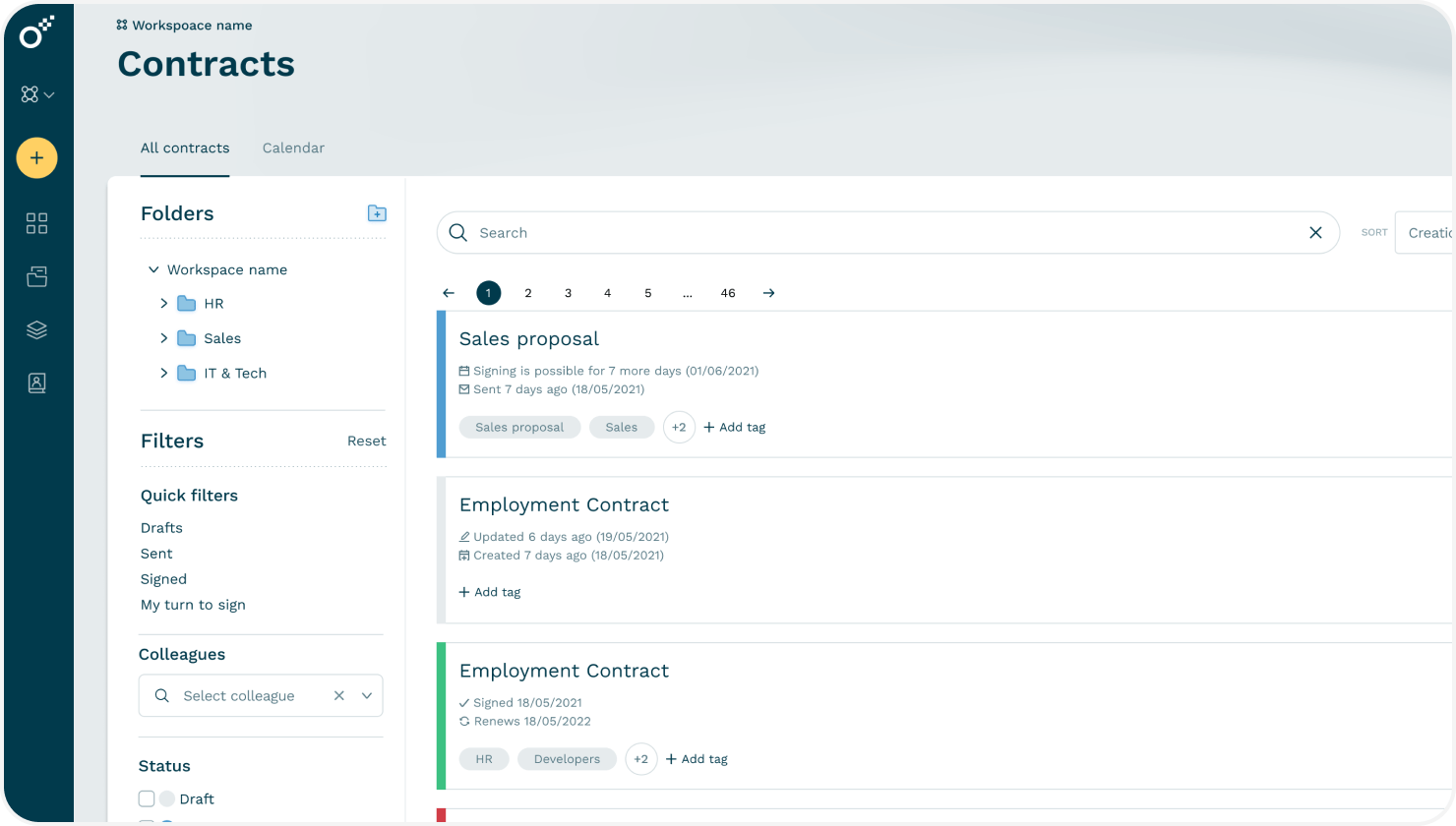
Oneflow is a digital contract management platform designed to handle the entire contract lifecycle efficiently, presenting a strong alternative to PandaDoc. It modernizes every stage of contract management—from drafting and e-signing to ongoing administration and renewals. By converting static agreements into dynamic digital contracts, Oneflow streamlines processes, enhances collaboration, and boosts overall productivity, enabling teams to close deals more swiftly and manage contracts more effectively.
Key features of Oneflow
Oneflow AI: Uses AI to help you draft contracts, suggest improvements, and spot potential risks, making the whole process smarter and more efficient.
E-signatures: Lets you get legally binding signatures right within the platform, so signing contracts is quick and hassle-free.
Tracking: This feature monitors your contracts’ status, deadlines, and activities, giving you updates and reminders to stay on top of everything.
Workspaces: This offers a shared space where you and your team can collaborate on contracts, edit documents in real time, and stay organized.
Pros and cons of Oneflow
| Pros | Cons |
| Strong protocols for data protection | No ability to sign documents on every page or review before final approval |
| Connects well with other systems | Missing features, like in-line editing and audit trails, limit the usability |
| Adaptable for various contract types | Higher cost for premium features |
Oneflow is built with contract management in mind, focusing on real-time collaboration and dynamic document handling. This means you can make live edits and updates, which is much more flexible and efficient than PandaDoc’s more static approach.
Oneflow gives you a central spot to handle everything related to contracts, from tracking statuses and deadlines to staying updated. This can give you better overall control than PandaDoc’s document management features.
5. OneSpan Sign
Suitable for
Large Enterprises, Financial Institutions, Legal Teams
About OneSpan Sign
OneSpan Sign is an electronic signature solution that facilitates the secure and efficient signing of legally binding documents. It allows users to send unified documents for signature via email, and recipients can sign them easily through a link to a signing ceremony. The platform is noted for its high user satisfaction ratings, particularly among enterprise users, who appreciate its ease of use, quality of support, and customization options.
Key features of OneSpan Sign
Identity Verification: This process ensures the authenticity of signers through advanced verification methods, such as biometric checks and identity document validation, enhancing security and compliance.
eSignature Integrations: Integrates seamlessly with various CRM, ERP, and document management systems, allowing for a smooth workflow and easy incorporation of e-signature capabilities into existing processes.
Virtual Room: Provides a secure, online space for document discussions and negotiations, allowing all parties to collaborate and finalize contracts in a controlled environment.
Notary: Offers electronic notarization services through digital signatures to validate unified documents and signatures, ensuring that they meet legal requirements and are recognized as legally binding.
Pros and cons of OneSpan Sign
| Pros | Cons |
| Quick implementation and intuitive design | Difficult reassignment functionality |
| Consistently reliable with minimal downtime or technical issues | Locating specific documentation can be difficult at times |
| Strong onboarding process during the initial setup phase | Complex transition from test to production |
Choosing OneSpan Sign or PandaDoc will depend on whether an organization prioritizes secure e-signatures or seeks a more integrated document management solution with advanced features.
6. Proposify
Suitable for
Sales teams, Marketing department
About Proposify
Proposify is a top contender among the best PandaDoc alternatives. It’s a proposal management platform that makes creating, customizing, and tracking sales documents straightforward. While PandaDoc offers a wide range of document automation and e-signature features, Proposify zeroes in on perfecting the proposal process. It helps you put together polished proposals that catch clients’ attention and excel in managing proposals throughout the entire lifecycle.
Key features of Proposify
Proposal Templates: This gives you access to various customizable templates to create polished, professional proposals without starting from scratch.
Content Library: This tool lets you store and reuse your content, clauses, and branding elements, keeping everything consistent and saving you time.
Interactive Quotes: The proposal includes interactive pricing tables that let clients select and tweak their options, making it easier for them to customize what they need.
Pros and cons of Proposify
| Pros | Cons |
| Integrates well with most CRM programs, invoicing software, and project management tools, providing a seamless workflow | Creating highly customized proposals is challenging and frustrating |
| Real-time alerts of client interactions and payment statuses | Free plan restricts users to a maximum of five active proposals, which may hinder engagement opportunities |
| Ready-to-use, reusable templates that save users time compared to creating proposals from scratch in Word or Excel | – |
Proposify’s interactive pricing tables allow users to customize their package and see the associated costs. PandaDoc lacks this specific feature.
Facing limitations with PandaDoc’s API integration with HubSpot?
You need an alternative contract tool like HyperStart with native CRM integration.
7. Qwilr
Suitable for
Small to medium-sized businesses, Enterprise-level organizations, Sales and marketing teams
About Qwilr
Qwilr is a cloud-based solution software that turns traditional PDFs into interactive web pages, making it easier to create documents such as proposals, quotes, and sales materials that are more engaging. It allows you to embed videos, images, and interactive pricing tables, creating a dynamic client experience.
With real-time analytics and integrations with tools like HubSpot and Salesforce, Qwilr helps sales and marketing teams impress clients and close deals faster.
Key features of Qwilr
Interactive proposals: Create engaging, interactive proposals that captivate your clients and make it easy for them to review and respond.
E-signatures and payments: Handle signatures and payments all in one place, speeding up the process and making transactions hassle-free.
CRM integration: Link with your CRM to keep all your data synced and your sales process running smoothly.
Pros and cons of Qwilr
| Pros | Cons |
| Can share demo recordings, product overviews, and other key materials with multiple stakeholders in one place. | Formatting limitations |
| Client engagement tracking | New users might need some time to get the hang of all the features. |
| Implementing Qwilr is smoother | – |
With Qwilr, proposals are delivered as interactive web pages, which makes them visually engaging and much more appealing for clients, helping to fight document fatigue with a dynamic experience. In contrast, PandaDoc typically uses traditional formats like PDFs, which are better suited for formal agreements and contracts but might lack the same level of interactivity and visual appeal.
8. RFPIO
Suitable for
Enterprise companies
About RFPIO
Responsive.io is a platform designed to streamline the management and response to RFPs and similar documents. It supports unlimited documents, allowing users to create, store, and manage various proposals and responses without restrictions.
Additionally, you can customize proposal templates and create tailored selling documents with options for adding tables, images, and rich text. This makes it an excellent choice for companies handling numerous proposals or looking to enhance their chances of winning bids.
Key features of RFPIO
LookUp: Lets you access your company’s knowledge base from anywhere, so you can quickly find the info you need on the go.
Proposal builder: Makes it easy for sales teams to whip up polished, on-brand proposals, boosting the quality of your submissions and giving you a better shot at winning deals.
Profile center: Helps you create pre-filled documents that are securely stored and shared, keeping everything consistent and accurate.
Pros and cons of RFPIO
| Pros | Cons |
| Content library stores previous responses for quick reuse. | Integration options with other tools to be limited. |
| Automates repetitive tasks, like generating responses from your knowledge base, which means fewer mistakes and less manual work. | Occasional bugs or glitches in the software. |
| Multiple users can work on the same document at the same time | – |
RFPIO has a significant edge with its automation and AI-powered features, which can automatically import documents and suggest answers from its content library, saving you much time. In contrast, PandaDoc requires more manual input for adding content, though it provides a library for storing and reusing information once it’s been added.
9. Docusign
Suitable for
Businesses of all sizes
About Docusign
Docusign is a popular digital tool and a well-known PandaDoc alternative that makes it easy to sign documents electronically, eliminating the need for paper or physical signatures. For a detailed head-to-head breakdown, see our PandaDoc vs DocuSign comparison. Whether you’re closing deals, signing contracts, or managing agreements, Docusign helps streamline the process by allowing you to send, sign, and store documents securely online.
It’s widely used across various industries because it’s reliable, legally compliant, and integrates well with many other business tools, making it a great fit for small and large enterprises.
Key features of Docusign
eSignature: Get secure, legally binding electronic signatures that are recognized all over the globe, so signing documents is quick and hassle-free.
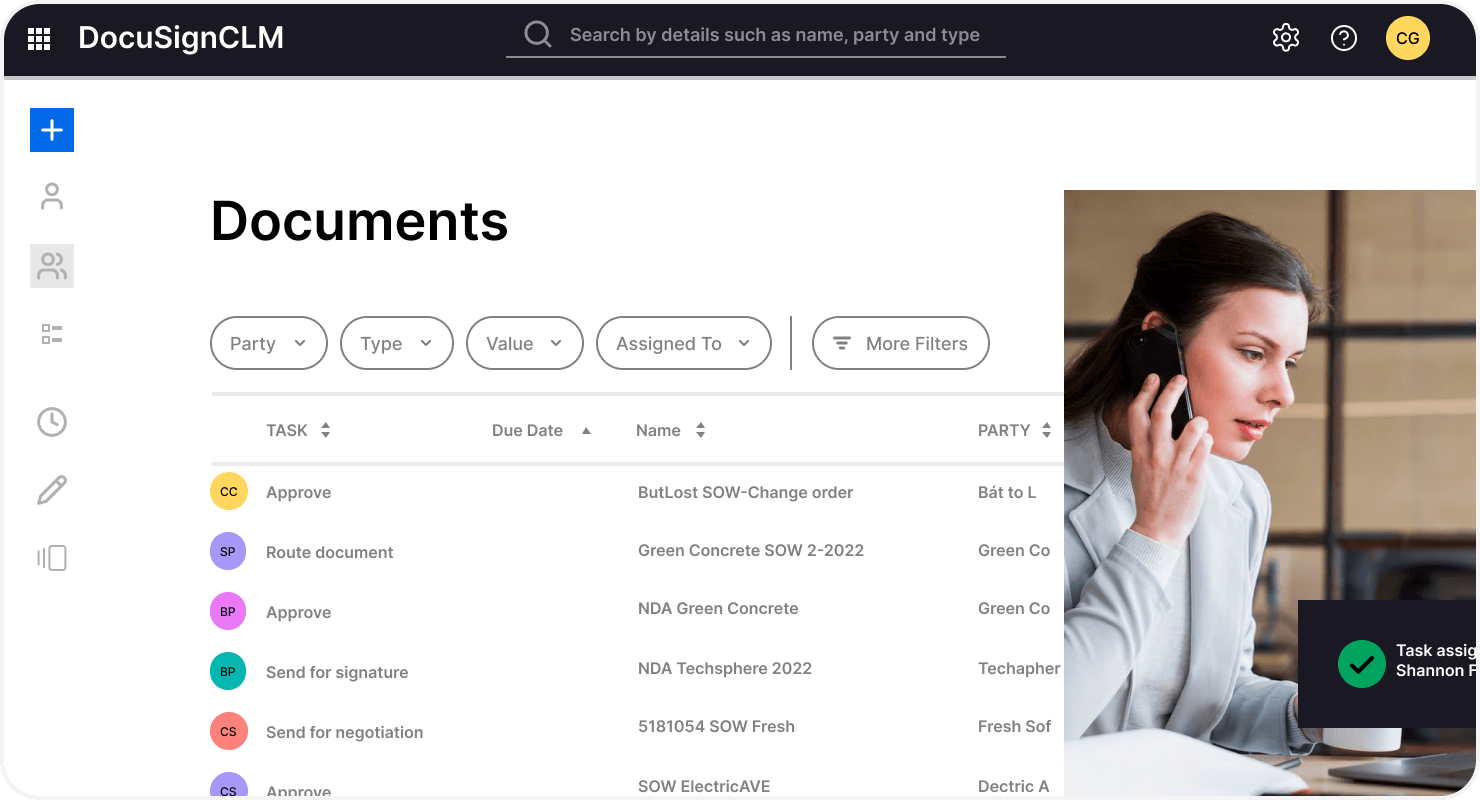
Document Management: Easily send, sign, and store your documents in the cloud, keeping everything safe and organized.
Integrations: It effortlessly connects with over 900 apps, such as Salesforce, Google Workspace, and Microsoft 365, enhancing your overall document workflows.
Pros and cons of Docusign
| Pros | Cons |
| Convenient and easy to use | Limited customization options |
| Secure and legally binding | Slow customer support |
| Integrates with other platforms | – |
DocuSign features a straightforward, user-friendly interface that’s easy to navigate, making it perfect for those seeking a simple e-signature solution. If you’re also evaluating DocuSign, check out our guide to DocuSign alternatives. PandaDoc comes with a more extensive range of features, which can result in a steeper learning curve for some users.
10. GetAccept
Suitable for
Sales Teams, B2B Companies
About GetAccept
When considering PandaDoc alternatives, GetAccept stands out as a solid choice for sales teams looking to enhance the entire sales workflow. With GetAccept, you can create, send, track, and sign documents like proposals, contracts, and quotes. Plus, it’s crafted to improve customer engagement and streamline your processes, making closing deals easier. If you need a platform that seamlessly integrates into your sales process and facilitates document creation and signing, GetAccept is a strong choice.
Key features of GetAccept
Digital sales room: A virtual sales office where you can share interactive content and chat with prospects in real time.
Sales process control: Having a personal coach for your sales process is like helping you keep everything on track and running smoothly.
CRM integration: It effortlessly integrates with your CRM, so all your sales data stays synced and up-to-date without hassle.
Personalization: Lets you tailor your messages and content to resonate with each prospect, making your communication feel more personal and engaging.
Pros and cons of GetAccept
| Pros | Cons |
| Send and receive signed documents almost instantly. | The platform often prompts users for feedback after contract completions, which feels disrupting. |
| Ability to create and customize templates for different clients is commendable. | Glitches and difficulties with features such as CRM synchronization. |
| Ability to embed videos in proposals adds a personal touch and enhances client engagement. | – |
GetAccept is all about making your proposals exciting and engaging. You can add videos, pricing calculators, and other cool stuff to wow your customers. It’s like creating a little interactive presentation. PandaDoc, on the other hand, is more traditional. It creates PDFs, which are great for formal agreements and contracts.
Manage documents and other contracts with HyperStart effortlessly
For teams migrating away from PandaDoc, the most common reasons cited in G2 reviews are the need for stronger CLM depth — specifically version control, clause libraries, and external redlining. HyperStart addresses all three. If your primary need is proposal design and visual sales documents, Qwilr or Proposify will likely be a better fit. If you need full contract lifecycle management with AI extraction, HyperStart is the more appropriate replacement.
If you want to streamline your contract management workflow, HyperStart CLM is the solution you’ve been waiting for. Book a demo now.